

-
Chart your game's course to Apple platforms
Explore key strategies for bringing existing games to the unified Apple ecosystem, whether you're creating in engines or porting custom PC titles with the Game Porting Toolkit. Learn how you can leverage Apple tools, frameworks, and open-source Unity plug-ins to optimize performance, integrate native features, and reach players across iPhone, iPad, Mac, and Apple Vision Pro.
This session was originally presented as part of the Meet with Apple activity “Press Start: Game development on Apple platforms.” Watch the full video for more insights and related sessions.资源
-
搜索此视频…
Yeah. Good morning.
So my name is Allan Schaffer. I'm part of the technology evangelism team here at Apple. And just delighted to be here with an audience of game developers. I feel like I'm among family here. This is great. So thank you all for being with us here today. Also up there, thank you to the online audience as well.
So you've just heard about the incredible momentum and the opportunity that's available across our platforms, everything from Triple-A titles that are launching day and date on the Mac to groundbreaking games coming into Apple Arcade. All of that energy is very real, and we want you to be a part of it.
And if you've been developing for Apple platforms for a while, or if it's been a while since you've dived in, you might be surprised to see how much the technology stack has evolved over time.
You know, with the introduction of Apple Silicon to the entire lineup now, it's now possible for your game to target Mac, iPad, and iPhone from a single code base. We call this Apple's unified gaming platform, and this architecture means that even very graphically demanding games, high performance games can run across this full range of hardware and platforms.
And the unified architecture is also the foundation for building games for spatial computing on Apple Vision Pro. So many of the core principles are the same here. So optimizing your assets, tuning performance for Apple Silicon and taking advantage of our native frameworks. And later this afternoon we'll show you how to take some of those first steps.
But. So how do you bring your game to this platform? And of course, there's many different starting points. All of you have a unique starting point for you.
You know, some of you might be building your first game from scratch. Perhaps you already have a successful title or multiple titles up on the App Store or on another platform, but for the next few minutes, I'm going to focus on two specific scenarios for bringing existing high performance games to the full, unified platform.
So the first of these scenarios is for those of you who are using a major game engine. The second is for developers who are developing a custom engine from an existing PC game and coming from DirectX X over to Metal, and we'll see if some of you might fit into either of these categories. But so let's start with those of you who are using a game engine.
So if you're an expert in unity or unreal, your path to the platform is very streamlined. These both of these engines have very deep support for our platforms, and they both leverage Metal in their renderers for direct access to the GPU.
And that makes it just very easy. They do the heavy lifting and makes it easy for you to target Apple platforms right out of the box.
Now, of course, many of you are targeting unity, right? I imagine here in the room. Yep. So and quite often for you it's just as simple. Or it can be as simple as going into the editor and choosing a mac or an iPhone or a Vision Pro as your build target and then use build pipeline. It understands our platforms, it understands it, understands our tools like Xcode and packages up all your assets. You know your materials, your shaders into the right formats automatically for you. And the situation is much the same for Unreal Engine as well. It has fully native support for Apple Silicon, and you can use the editor to target iOS, macOS and visionOS.
But now let's go back to unity for a second. So because all day today, you're going to hear us talk about various features and native APIs that you should be using. But if you're a unity developer, chances are you'll be thinking, well, okay, sure, those are great features, but how do I use them in a unity project, right? And the answer is our Apple Unity plug-ins. We have a wide set of them.
So these provide a bridge to native APIs into the features that players really have come to expect in games that are running on Apple devices. So each plugin exposes a C-sharp based unity script, which maps directly to the underlying framework. And this makes it easy to add new mechanics. Make your games more accessible. Tap into the latest features and game services on our platforms.
All right so let's start with these. Dive into these starting with Game Center.
So Game Center is Apple's social gaming network. And with the Game Center plugin you can easily integrate Leaderboards, Achievements, Challenges matchmaking and so on. And it's how you can tap into the Apple Games app helping you to connect with more players. And Misha is going to cover more of this this afternoon.
The Game Controller plugin gives you flexible input features with support for all of our Made for iPhone or MFI compliant controllers, as well as the popular controllers from Sony and Microsoft.
Now, in addition to game controllers, that framework supports input from keyboard and mouse. You also have access to controller specific button glyphs, so you can customize your UI at runtime based on the input device that the player has connected.
And for mobile devices, the framework also includes a fully customizable virtual on screen controller. And the key to that is that it behaves just like a physical controller. So with that same API, you can support touch input on screen without having to change any of your existing game logic.
All right. Now moving on to accessibility. So the accessibility plugin helps you to build experiences that are more playable for everyone by giving you access to assistive features like VoiceOver and Dynamic Type.
So with VoiceOver, this is our built in screen reader.
You can make your UI more navigable for players who are blind or who have low vision. And with Dynamic Type, your game's text can automatically adjust to the player's preferred reading size to ensure that it's always legible.
You can also create more immersive physical feedback, so the Core Haptics plugin lets you design and playback custom patterns that tightly synchronize haptics on the device and audio from what we call an app asset.
But the real power of this API is that the patterns aren't just static. You can modify them programmatically by adjusting parameters like their intensity and sharpness in real time. So, for example, you could tie the haptic intensity of an explosion to the player's distance from the blast. And so this means that haptic feedback can be driven dynamically by your game state.
Now let's mention audio. So I know that many of you are bringing your own audio middleware like Fmod or Wise. And both of those are great workflows, if that's what you're using, stick with them. But if you want to tap into a native solution, you can also use the Phase plugin.
So Phase isn't just a sound player, it's a full spatial audio engine. That means it understands your scene's geometry and materials to automatically handle effects like occlusion and reflection and reverberation.
So you can build up whole soundscapes in unity using the Sound Event Composer and create audio logic that then reacts to the game parameters in real time.
And then finally, tying all of this together is what we call the Apple Core plugin.
Get it? So yeah, it helps you to. Hey, that landed all right. So it helps you to manage build settings and simplifies all the build process. So this acts as a foundation for and dependency of all the other plugins.
All right. So this Apple Unity all these plugins are all open source. They're available for you today on GitHub. And you'll find the project source the documentation there, sample code, etc.. Everything you need to get started right here at this URL.
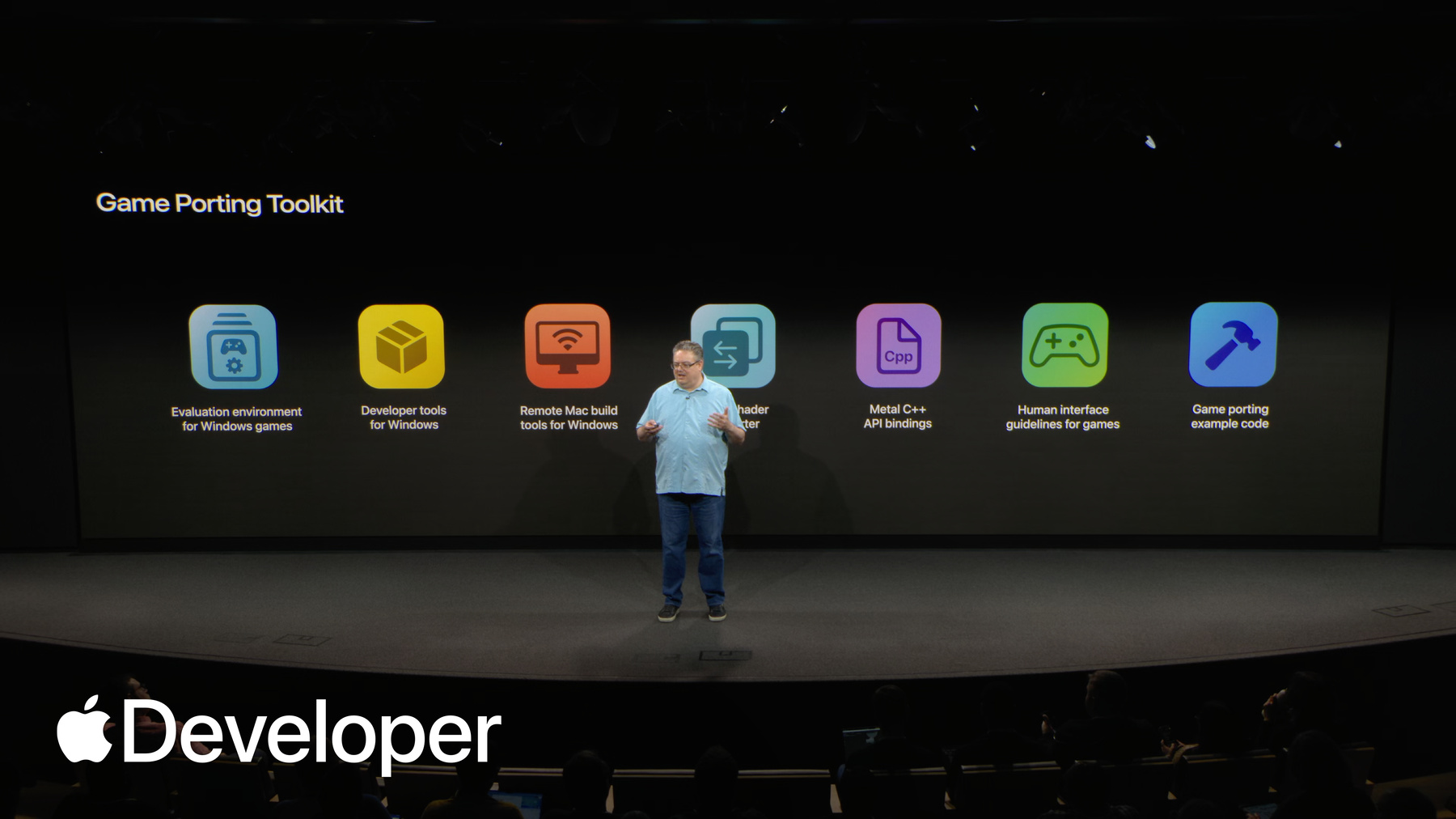
All right. So now let's talk about our second situation which might apply to some of you, which is porting an existing PC game over to our platform. So if your goal is to bring a windows or a console game to Apple platforms, we have actually a dedicated end to end suite of tools for you called the Game Porting Toolkit.
Now, the philosophy behind this toolkit is really to meet you where you are. If you're working on PC and leveraging, excuse me, enabling you to leverage your existing PC workflows and tools.
And obviously it's not just one thing, it's a whole suite of tools and resources that are designed to help you throughout your entire porting process, from the initial evaluation to native implementation and then the final polish. So let me walk through these.
So if you've already got a PC game that you're working on, the first tool that you can use is this evaluation environment. You can actually take your existing x86 windows binary as is and run it on your Mac. So it's going to use an emulation layer to translate the windows API calls to our platform APIs in real time.
And then just like that, your PC game will be up and running on a mac. So here you can see control by Remedy Entertainment. It's running on a MacBook Pro through the evaluation environment, and there's a new beta of the evaluation environment, by the way, that can support Sparse Textures, Sparse Buffers, etc. it has experimental support now for MetalFX Upscaling denoising and frame generation as well.
And then over there you see the Metal performance HUD enabled. And with that you can get just an immediate idea of your game's baseline performance running on a mac. And this is really going to help you triage your effort, showing you what's working well and which areas will need focus when you begin the porting effort.
Another thing is in while your game is running in this evaluation environment, all our graphics profiling tools in Xcode just work. So you can still use things like the Metal Debugger to capture and inspect a frame. You can use Metal System Trace to analyze the performance and all. That's before you've even written a single line of native Mac code.
Okay, so that's the evaluation environment. Moving on. So for those of you with established asset pipelines on windows, we also provide a whole set of Metal developer tools for windows.
And this lets you use your existing infrastructure to compile your graphics and compute shaders, convert textures into optimized formats for our GPUs, and do all of that. All of that on your windows machines. If that's where you're working, then when it comes to your build workflow, this is something that's brand new. This is the Mac remote developer tools for windows.
So this enables you to set up a mac for remote project building and debugging, and then trigger builds and debugs right from within Visual Studio.
So this is a way that you can bootstrap your port and really catch issues early. And cross platform projects that are also targeting Apple platforms.
Now, once you've evaluated performance, the next step often is to use the Metal Shader Converter. So this will automatically convert direct Intermediate language or DXIL into a Metal library. And it does things like preserve your debug information so that you can use the Metal tools in Xcode to validate and profile all those converted shaders right away.
Now, for those of you, if you're working on a PC, chances are your engine code is probably written in C++.
And so that's where Metal-cpp, which is just another piece of this toolkit, comes into play. It's a very lightweight, header only C++ wrapper for the entire Metal API. And that allows you to use Metal in a language that's already familiar with you and integrate it seamlessly into your existing code.
Now, this toolkit also includes our Human Interface guidelines for games. And now let me stop and think for a second, because this is actually something that's really essential for every developer here, regardless of your path, whether you're using an engine or you're porting from PC or just building natively or from scratch on our platforms. This is something that will really help you understand the platform conventions that players will be expecting.
It has advice on everything from your first launch experience to designing great on screen controls, handling input and a lot more. And we're actually going to deep dive on this in a session coming up a little later this morning.
And then the final piece here is the last piece of the toolkit is the game porting sample code.
Now don't let the name fool you in a way just like the the Human Interface guidelines, this is actually meant to have value for everybody. It's really useful as a tutorial for porting, but it's also just a complete standalone example of a native game built for Mac and targeting iPad and iPhone, so that makes it just a great reference for best practices really. Whether you're porting something from DX or building a custom engine, or if you want to use it as a foundation for a new project.
So let me show you a closer look. So this project is structured to guide you kind of step by step through the main elements of the reporting process, showing you the best practices for each element of your game.
And it's all organized into all the source code tutorial documentation and so on into these folders, with each one showing you exactly how to port your game systems like the graphics, shaders, audio game controllers, and everything else. Really. So for example, inside the folder for game input, I can see all the files that are in the project that handle that. But also there's a Readme file that explains exactly how to bring game input support over from another platform, and it just helps you understand and how to simplify your code.
And because it's a full Xcode project, you can just build it and run it and see how it all comes together. You can play around, use it as a base for a brand new game project, or feel free to take parts of it for use in your own projects.
And because it it builds, it includes build targets for both macOS and iOS, so you can just as easily build and run this game on an iPhone or an iPad. So that's a real time saver for bringing up a new game on our devices.
But okay, so that's a quick overview of the Game Porting Toolkit and just how it helps you to bring your PC games to our platforms. We're going to cover more of this process in the bring your PC and console games to Mac session. That's coming up a little later, and you can find the Game Porting Toolkit. Version three is now in beta, along with more sample code and documentation and lots of videos at developer.apple.com. Okay, so I've covered two of the paths here now for bringing your game to the unified platform. Whether you're using a third party engine or porting your existing PC game, or maybe for many of you, building from scratch.
Just to show, it's easy for you to target the full range of Apple devices and the path you choose. There is just the start.
But. So now to take you on the next step, I’d like to hand things over to my colleague Alexey. He's going to tell you more about our native gaming technologies. So thank you. And over to Alexey.
Thank you.
-