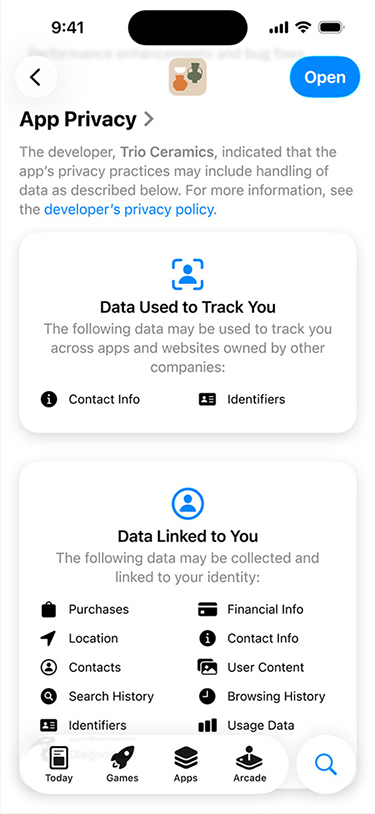
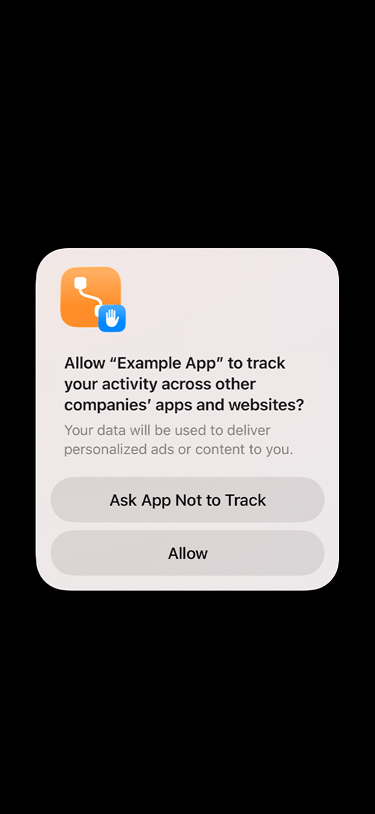
At Apple, we believe privacy is a fundamental human right. That’s why we’ve built a number of features to help users understand developers’ privacy and data collection and sharing practices, and put users in the driver’s seat when it comes to their data. With Privacy Nutrition Labels on the App Store and in App Privacy Report, users can see what data an app collects and how it’s used. And App Tracking Transparency (ATT) empowers users to choose whether an app has permission to track their activity across other companies’ apps and websites for the purposes of advertising or sharing with data brokers.
Describe how your app uses data
Privacy Nutrition Labels
The App Store helps users better understand an app’s privacy practices before they download the app. On each app’s product page, users can learn about some of the data types an app may collect, and whether the information is used to track them or is linked to their identity or device. In order to submit new apps and app updates, you must provide information about your privacy practices in App Store Connect.
If your app uses third-party code, such as advertising or analytics SDKs, you must describe what data it collects, how it is used, and whether it tracks users. Privacy manifest files outline these practices in a single standard format. When you prepare to distribute your app, Xcode combines all these manifests into one comprehensive report, making it easier for you to create accurate Privacy Nutrition Labels.
In iOS 14.5, iPadOS 14.5, and tvOS 14.5 or later, you need to receive the user’s permission through the App Tracking Transparency (ATT) framework in order to track them or access their device’s advertising identifier. Tracking refers to the act of linking user or device data collected from your app with user or device data collected from other companies’ apps, websites, or offline properties for targeted advertising or advertising measurement purposes. Tracking also refers to sharing user or device data with data brokers.
Examples of tracking include, but are not limited to:
Displaying targeted advertisements in your app based on user data collected from apps and websites owned by other companies.
Sharing device location data or email lists with a data broker.
Sharing a list of emails, advertising IDs, or other IDs with a third-party advertising network that uses that information to retarget those users in other developers’ apps or to find similar users.
Placing a third-party SDK in your app that combines user data from your app with user data from other developers’ apps to target advertising or measure advertising efficiency, even if you don’t use the SDK for these purposes. For example, using an analytics SDK that repurposes the data it collects from your app to enable targeted advertising in other developers’ apps.
The following use cases are not considered tracking, and do not require user permission through the App Tracking Transparency framework:
When user or device data from your app is linked to third-party data solely on the user's device and is not sent off the device in a way that can identify the user or device.
When the data broker with whom you share data uses the data solely for fraud detection, fraud prevention, or security purposes. For example, using a data broker solely to prevent credit card fraud.
When the data broker is a consumer reporting agency and the data is shared with them for purposes of (1) reporting on a consumer's creditworthiness, or (2) obtaining information on a consumer's creditworthiness for the specific purpose of making a credit determination.
Using the App Tracking Transparency framework
To request permission to track the user and access the device’s advertising identifier, use the App Tracking Transparency framework. You must also include a purpose string in the system prompt that explains why you’d like to track the user. Unless you receive permission from the user to enable tracking, the device’s advertising identifier value will be all zeros and you may not track them as described above.
While you can display the App Tracking Transparency prompt whenever you choose, the device’s advertising identifier value will only be returned once you present the prompt and the user grants permission. Use the purpose string to explain what this data will be used for to help the user understand what they’re opting in to share. If the user allows apps to request to track, but has turned tracking off for your app, you can ask the user to change their preference for your app by providing a shortcut to Settings where they can change the tracking permission.
The identifier for vendor (IDFV) may be used for analytics across apps from the same content provider. In this case, the use of the App Tracking Transparency framework is not required. The IDFV may not be combined with other data to track a user across apps and websites owned by other companies. You remain fully responsible for ensuring that your collection and use of the IDFV comply with applicable law.
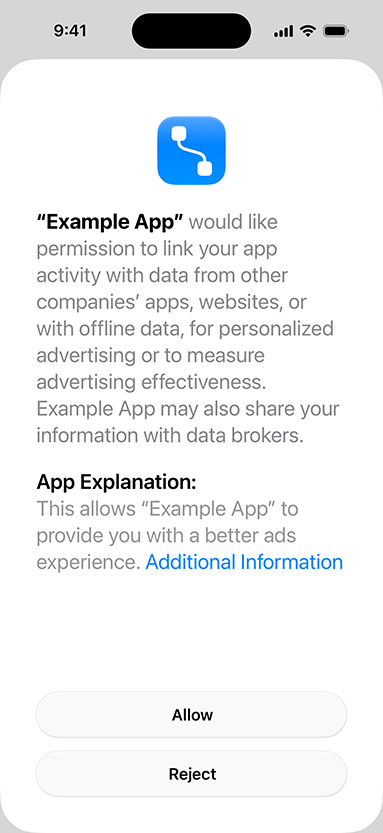
As part of agreements with select European competition authorities, Apple is introducing changes to its App Tracking Transparency framework in the European Union. Beginning with iOS 27.2 and iPadOS 27.2, developers will have the option to use an alternative version of the App Tracking Transparency system prompt in the EU. The requirements for when you must seek permission to track users will remain the same. Due to legal requirements, only the alternative version of the system prompt is available for apps distributed in Germany, France, Italy, Poland, and Romania.
The alternative version of the App Tracking Transparency system prompt has modified formatting and language and provides you the option to use a text button labeled “Additional Information.” This allows you to surface additional information about your request to link user or device data collected from your app with user or device data collected from other companies’ apps, websites, or offline properties for targeted advertising or advertising measurement purposes, or to share user or device data with a data broker.
In addition, for users in the European Union, you can reprompt a user via the App Tracking Transparency system prompt one year after the user’s previous choice in your app’s App Tracking Transparency system prompt, regardless of whether that choice was to accept or reject. A user cannot be re-prompted if they have disabled “Allow Apps to Request to Track” (renamed to “Allow Apps to Request to Link Your Activity Across Companies” in the EU) in their device’s Settings.
For technical details on using the alternative App Tracking Transparency system prompt and optional text button in the European Union, see:
Can I explain to users why I would like permission to track them before I show the tracking permission prompt?
Yes, so long as you are transparent to users about your use of the data in your explanation. Per the App Review Guidelines: 5.1.1 (iv), apps must respect the user's permission settings and not attempt to manipulate, trick, or force people to consent to unnecessary data access.
If I have not received permission from a user via the tracking permission prompt, can I use an identifier other than the IDFA (for example, a hashed email address or hashed phone number) to track that user?
No. You will need to receive the user's permission through the App Tracking Transparency framework to track that user.
If a user provides permission for tracking via a separate process on our website, but declines permission in the App Tracking Transparency prompt, can I track that user across apps and websites owned by other companies?
Developers must get permission via the App Tracking Transparency prompt for data that's collected in the app and used for tracking. Data collected separately, outside of the app and not related to the app, is not in scope.
Can I fingerprint or use signals from the device to try to identify the device or a user?
No. Per the Apple Developer Program License Agreement, you may not derive data from a device for the purpose of uniquely identifying it. Examples of user or device data include, but are not limited to: properties of a user's web browser and its configuration, the user's device and its configuration, the user's location, or the user's network connection. Apps that are found to be engaging in this practice, or that reference SDKs (including but not limited to Ad Networks, Attribution services, and Analytics) that are, may be rejected from the App Store.
If I share data with a consumer reporting agency to conduct fraud checks, and separately share data with them as part of a credit check or for credit reporting purposes, do I need permission to track?
No. You do not need permission from the user when a data broker uses the data shared with them solely for fraud detection or prevention or security purposes. You also do not need permission from the user when sharing data with a consumer reporting agency and the data is shared with them for purposes of (1) reporting on a consumer's creditworthiness, or (2) obtaining information on a consumer's creditworthiness for the specific purpose of making a credit determination.
Do I need to use the App Tracking Transparency framework to get user permission to use third-party deep-linking or deferred deep-linking tools?
Yes. If your application uses any third-party services that pass unique identifiers or create a shared identity of the user between applications from different companies for ad targeting, ad measurement, or sharing with a data broker, your app will need to request permission from the user using the App Tracking Transparency framework.
I have integrated an SDK from another company. Am I responsible for the data collection and tracking of users of my app by that company?
Yes. Developers are responsible for all code included in their apps. If you are unsure about the data collection and tracking practices of code used in your app that you didn't write, we suggest contacting the developer of the SDK.
I have integrated single sign-on functionality provided by another company. Am I responsible for the data collection and tracking practices of that company?
Yes. Developers are responsible for all code included in their app, including single sign-on (SSO) functionality provided by third parties. If the user will be subject to tracking as a result of SSO functionality included in your app, you must use the App Tracking Transparency prompt to obtain permission from that user first.
What kind of company constitutes a data broker?
Data brokers are defined by law in some jurisdictions. In general, a data broker is a company that regularly collects and sells, licenses, or otherwise discloses to third parties the personal information of particular end-users with whom the business does not have a direct relationship.
What identifiers or data are governed by the "tracking" policy?
Any user or device level identifier that is used to join data from your app with data from third parties (including SDKs used in your app) for purposes of advertising or ad measurement or sharing with a data broker. This includes, but is not limited to, the device's advertising identifier, session ID, fingerprint IDs, and device graph identifiers. If your app receives or shares any of these identifiers for the above listed purposes, you must use the App Tracking Transparency framework to obtain user consent.
If tracking occurs within a webview inside an app, do I need to use the App Tracking Transparency prompt?
Yes. If you are using a webview for app functionality, it should be treated the same way as native functionality in your app, unless you are enabling the user to navigate the open web.
What OS versions require App Tracking Transparency permission to access the value of the IDFA?
To access the value of the IDFA for users on iOS/iPadOS version 14.5 or later, you will first need to receive permission from the user through the App Tracking Transparency prompt. For additional guidance on tracking, please refer to App Review Guidelines: 5.1.1 (iv).
Can I offer a control in my app, separate from ATT, to comply with local privacy laws?
Yes. You can offer separate privacy controls in your app. You can also provide a shortcut to Settings to enable the user to change their preference for your app with regard to the App Tracking Transparency permissions. When offering a separate control to comply with local privacy laws, please consider the following:
Don't confuse the user. Be clear that the control doesn't override their previous ATT choice.
Provide context. If possible, show the user's ATT status as part of a separate control so they can understand the choices they've already made.
Be clear about what the choice is. If the user has not granted ATT permission, and there is no additional data use beyond the scope of ATT, be clear that no further action is required. If the user has granted ATT permission, it should be clear what impact the separate control will have on their ATT choice.
Can I add other permission requests in order to comply with legal obligations or regulations?
Yes, you can choose to include screens in order to comply with applicable law or government regulations. However, your app must always respect the user’s response to the App Tracking Transparency prompt, even if their response to other prompts conflicts. Guideline 5.1.1 (iv) states: "Apps must respect the user's permission settings and not attempt to manipulate, trick, or force people to consent to unnecessary data access." This includes altering a user’s App Tracking Transparency response by only respecting their response to other permission requests. You can use third-party Consent Management Platforms to add these permission requests, as long as your collection and use of device or user data collected from your app does not contradict a user’s App Tracking Transparency response. You remain fully responsible to ensure that your collection and use of information linked to users’ identity or to their device, including information used to track users, complies with applicable law or government regulations.
Can I reference consent requests to comply with local privacy laws in my app’s App Tracking Transparency system prompt?
Yes. If you have already prompted the user with a prompt to comply with government regulations for data practices covered by App Tracking Transparency, e.g. using a third-party Consent Management Platform, and the user consented, you have the option to reference that previous legal consent in your app's App Tracking Transparency system prompt purpose string. When doing so, please consider the following:
Don’t confuse the user. Be clear about how the impact of the user’s respective choices.
Be consistent. You should not display the ATT prompt to users who have opted out of all relevant legal consent choices made in the previous, separate control.
You remain fully responsible to ensure that your implementation of consent requests in combination with the ATT prompt complies with applicable privacy laws.
Can I provide additional information and consent controls with my app’s ATT prompt implementation, to comply with local privacy laws in the European Union, such as ePrivacy or GDPR?
Yes. In the European Union, you have the option to use the “Additional Information” text button in the ATT prompt to surface additional information and more granular consent controls to comply with local privacy laws or other applicable legal requirements for the collection and use of device or user data collected from your app that are described in your app’s App Tracking Transparency system prompt. Any additional information related to your request or more granular consent controls provided via the text button are entirely your responsibility. However, you cannot access the device’s advertising identifier, or otherwise collect and use device or user data from your app as described in the App Tracking Transparency system prompt, until the user has granted your app permission in that prompt. When implementing this “layered” approach to comply with local privacy laws, please consider the following:
Provide context. The purpose string in the App Tracking Transparency system prompt should contain the most important information about your intended collection and use of the advertising identifier or other relevant device or user data collected from your app, in line with local privacy laws and regulatory guidelines. You can also include information in the purpose string in the App Tracking Transparency system prompt to explain to your user what additional information and granular consent controls they can obtain by tapping on the “Additional Information” text button.
Be consistent. After a user taps on “Additional Information” and accesses the relevant screen in your app or page in your website, you can redirect the user back to the App Tracking Transparency system prompt for your app to ensure their choice is recorded in the App Tracking Transparency framework. However you should not redirect users to your ATT prompt if they have opted out of all relevant legal consent choices in the screen or page surfaced.
Assess the clearest and most suitable option for your app. The ability to link to additional information and more granular consent controls within the App Tracking Transparency prompt for your app is entirely optional. In addition, you remain free to add other permission requests and separate controls for your app independently from App Tracking Transparency (see Questions above).
You remain fully responsible to ensure that your implementation of the App Tracking Transparency system prompt and any corresponding information surfaced via the “Additional Information” text button complies with applicable privacy laws.
App Privacy Report
With iOS and iPadOS, users can turn on App Privacy Report to see details about how often apps access their data — like location, camera, microphone, and more. They can see information about each app’s network activity and website network activity, as well as the web domains that all apps contact most frequently.
Advertisers can use AdAttributionKit — Apple’s privacy-preserving, industry-leading technology — to attribute in-app ad campaigns and web ads on mobile, while maintaining user privacy.