

-
Code-along: Build powerful drag and drop in SwiftUI
Follow along as we build a game of Solitaire to explore the latest drag-and-drop capabilities in SwiftUI. We'll show you how to use the new reordering API to let people arrange content, implement drag containers to move multiple items at once, and customize the drag-and-drop lifecycle to fit your app's rules. To get the most out of this session, watch “Meet Transferable” from WWDC22.
Chapters
- 0:00 - Introduction
- 1:42 - Reordering
- 6:50 - Drag multiple items
- 9:59 - Drag configuration
- 14:29 - Next steps
Resources
Related Videos
WWDC22
-
Search this video…
Hi, I'm Jack, an engineer on the UI Frameworks team. In this video, I'd like to share with you some of the new drag and drop APIs available in the 2027 releases.
Since iOS 16, SwiftUI has provided drag and drop through the draggable and dropDestination modifiers. The draggable modifier allows people to move content, like photos and text, throughout the system by using a drag gesture. You can conform your data to the Transferable protocol, giving it a transfer representation that allows it to be dragged through the system and accepted by other apps. For example, I can conform my card type to Transferable and then pass an instance of it to the draggable modifier. The dropDestination modifier allows your app and views to accept all kinds of content. You decide what data your view can handle by specifying a Transferable type to accept.
If I want my view to accept card instances, for example, I can provide the card type to the dropDestination modifier. For more information about how to make your content Transferable, I'd recommend watching the video "Meet Transferable" from WWDC 2022. SwiftUI has expanded the capabilities of drag and drop in three major ways. There's a new reordering API, that allows people to rearrange content using drag and drop.
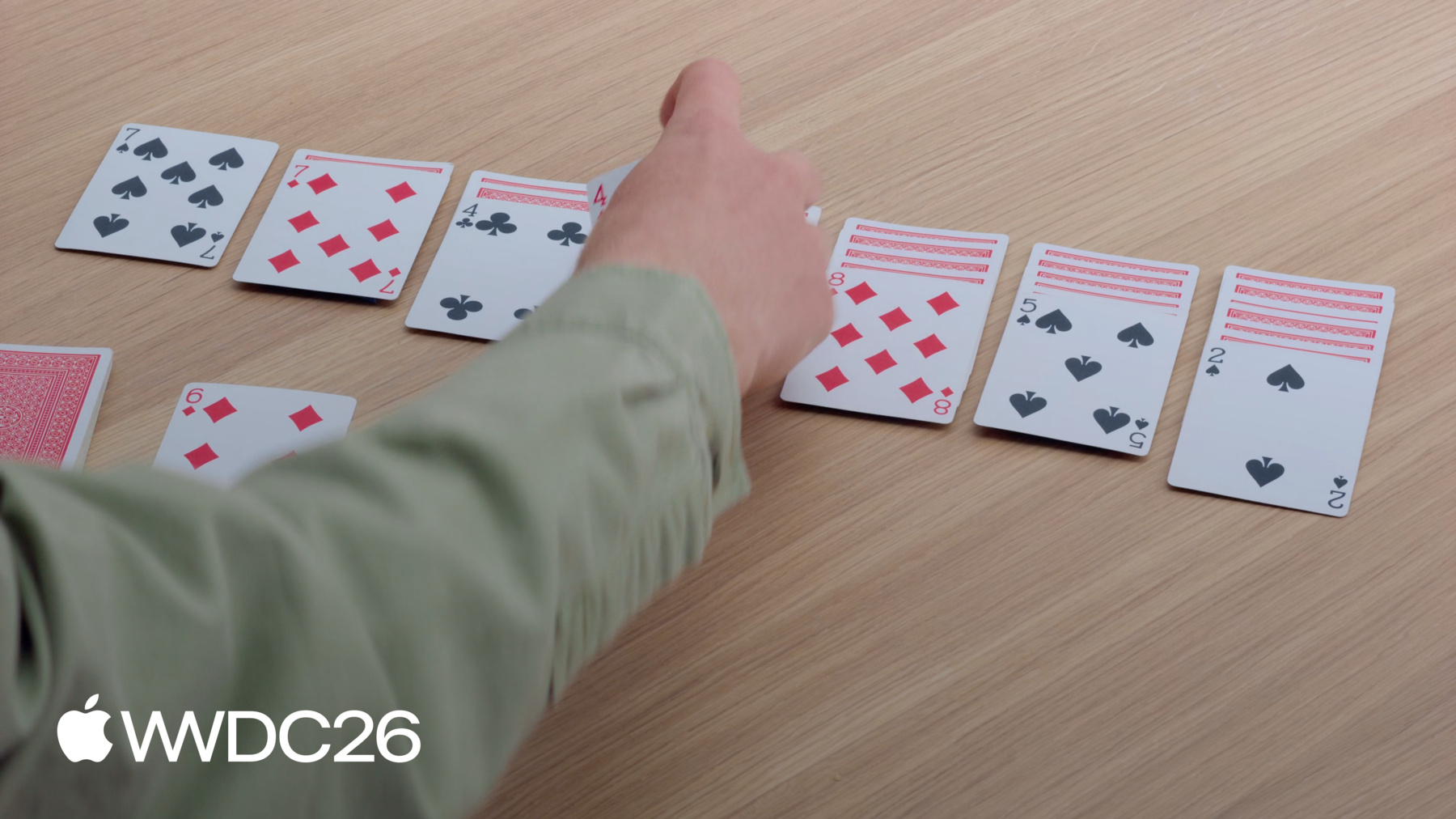
You can enable people to drag multiple items at a time using the Drag Container APIs. And you can now configure how data is transferred in drags and at dropDestinations. I'll be implementing the drag and drop interactions for a game of Solitaire. The game will look similar to how I've arranged these playing cards. I can move cards between the piles, and I can pull a card from the deck of the remaining cards.
You don't need to be familiar with Solitaire to understand the API I'll be using. If you'd like to follow along, you can download the sample project. It contains the views and game logic needed to get started. I'll start by adopting the new reorderable API in my app. Just like the cards in my Solitaire game, your app's content likely exists in some order. But people might want to change that order to organize their content in the way that works best for them. When I make the cards in the Solitaire game reorderable, I'll be able to drag them individually. When I drag a view, it'll be lifted from its position in the view hierarchy and an empty placeholder will take its spot. From there, I can drag this card throughout my app. As I move the card over other cards, they make space for me to drop the one that I'm dragging.
The placeholder updates to reflect where the dragged card will go once I drop it. And when I drop the card, it will be moved to its new position. I'll add this capability to my Solitaire game. I'll first implement reordering without the game rules in place. Then, once everything's working, I'll refine the implementation to include the rules. I've opened the Xcode project for this app. Its contents are split into two main folders: Game and Views. The Game folder contains the SwiftData models and code for updating them. I'm going to be spending most of my time in the Views folder, where the SwiftUI is.
I'll open to GameView, which contains the layout and views of the playing area. But before I add reordering to my app, I'm going to test it out in a Preview. At the bottom of this file, I have one that shows four cards on a green background. To enable reordering, I add the reorderable modifier to the ForEach that creates the cards.
Then, I put a reorderContainer modifier on the HStack.
I specify that the item type of the container is CardValue, which matches the type used in my ForEach view. In the closure, I'm provided a difference at the end of an operation, and I handle it by updating my cards array.
Now, I can interact with the Preview and reorder cards. I can drag the ace of clubs from the left and drop it at the end. In Solitaire, my goal is to organize cards by moving them between the piles. So in my app, I want all of the piles to be in the same reorderContainer.
I can accomplish this by adding the reorderContainer modifier to the HStack that contains the piles.
I provide the same CardValue type for the container's item type. Because there are multiple piles, I need a way to uniquely refer to each of them. I use the Card.Group type to identify each pile, and, in the closure, I handle a difference across multiple piles.
Lastly, I need to go to PileView and add the reorderable modifier. Because I have multiple reorderable modifiers in the same container, I need to provide a unique identifier for each one. Now, I can drag the four of diamonds and drop it onto the pile with the five of spades.
This is great, but there's one more refinement I'd like to make right now. In Solitaire, you can't reorder the face down cards. But right now, I'm able to lift one from a pile. This is because I made the entire array of cards in PileView reorderable. While I could use some advanced drag and drop API to control this, there's an even easier way to solve this.
I can add a second ForEach view without the reorderable modifier and slice the cards array between the two.
The first ForEach view contains all of the face down cards.
The second, with the reorderable modifier, contains all of the face up cards. With this change, I can still reorder the face up cards, but when I drag on a face down card, nothing happens.
Now, I have the basic interactions of Solitaire in play.
Because of the reorderable modifier, I can now drag individual cards around to reorder them. The reorderContainer modifier allowed me to scope reordering to include all of the piles. And by moving the face down cards into a separate ForEach, I was able to keep them from being reordered. These APIs are newly available on all Apple platforms that support drag and drop.
But my Solitaire game is still missing a critical part of the gameplay, being able to move multiple cards at once. In Solitaire, when I drag a card in the middle of a pile, it brings the cards stacked on it. But in your app, the interaction model might not be as straightforward. One way to handle this is to add selection to your draggable items. In this example, I'll use a simple tap-to-select interaction model. As I tap each card, it's added to the selection.
Once I perform a drag gesture on one of the selected cards, all three cards lift together.
I'll add the ability to drag multiple cards at once to my Solitaire game. I'll open back up to GameView, where I added the reorderContainer modifier.
Reorder containers implicitly provide their own dragContainer and dropDestination capabilities, but I can add my own to customize this behavior. I declare the dragContainer modifier below the reorderContainer modifier.
For them to work together, I need to make sure that they use the same type, CardValue.
In the closure, I'm given an item identifier, and I need to provide transferable data for the items that I want to move.
I call out to my game logic to find the cards stacked above the one I'm trying to drag.
When I drag this four of clubs, which is below a three of diamonds, I now get both cards in the same drag.
When I dragged the stack of cards together, they collapsed into a pile, with the first card on top. This is the default preview, but I can configure it to several options, including pile, list, and stack. I can configure this with the dragPreviewsFormation modifier.
I choose stack because it's compact and has the feel of stacked cards. When I drag the four of clubs now, the cards form into a neat stack. But when I drag over the piles, they revert back to the default appearance. Because they are above my reorderContainer's dropDestination, they're using its drop formation. To configure that, I can use the dropPreviewsFormation modifier. Because I want this to be consistent across all dropDestinations in my app, I declare this modifier on the root layout of my GameView. Now, the cards I drag maintain the same appearance throughout the playing area.
I made it possible to drag multiple cards at a time in my Solitaire game. I used the Drag Container API to make it possible to lift more than one at a time. I added dragPreviewsFormation to customize the appearance of the lifted cards, and I ensured a consistent appearance by setting the same value for dropPreviewsFormation.
The dragContainer modifier is newly available on iOS, iPadOS, and visionOS 27. All three modifiers are available on macOS 26 and newer.
To implement the remaining parts of the game, I'll use the new Drag Configuration API. When adding a drag capability to my card view, I should think about how I want that card's value to move. In my Solitaire game, I'll be dragging new cards into the piles.
By default, SwiftUI will suggest that the data moves by copy. This works well when you're moving data between apps or inserting something new. But in my card game, dragging a card should not create a copy at the destination. Instead, I'd like the card to be moved from the deck into the piles. Unlike my reorderContainer, which is designed to handle moves, these Views are a separate drag source and dropDestination. I'll need to use the new Drag Configuration API to achieve this. I'll add the ability for cards to be moved into the piles without duplication by using the Drag Configuration API.
In the app, I have the deck of remaining cards on the top left of the playing area. I want to be able to drag this six of diamonds onto the pile with the seven of spades.
To get started, I open Xcode to RemainderView, which contains the views for this part of the game. The current face up card already has its own drag modifiers.
By default, this view will transfer the value by copy. I add the dragConfiguration modifier to this view and specify that my intent is for this card to be transferred by move.
But it's the dropDestination that decides how the data is transferred. In this case, my dropDestination is the reorderContainer in GameView. By default, the reorderContainer only accepts moves within the container. If I want to accept new items, I have to provide my own dropDestination modifier. I add one below the dragContainer, and I specify that I want to accept the same card type.
I read the reorderContainer's destination value for the inserted items, and if it exists, I call into game logic to insert the newCards at the destination.
Moves between piles are still handled by the closure on the reorderContainer modifier.
With the dropDestination in place, I can now configure how it receives items. I add the dropConfiguration modifier, which has the final say about how the data is transferred.
I'm provided session information in the closure, and I can use that to return a dropConfiguration that tells the dropDestination how to accept the card.
I do three things in this closure. First, I determine which pile should receive the cards by checking where the drag is. I create a destination value with that pile's identifier to tell SwiftUI where the cards should go.
Second, I express my intent to only support move-based transfers.
Normally, you'd want to support copying as a fallback when move isn't available, but in a card game, copying doesn't make sense.
And third, I validate that this destination value is allowed within the rules of the game. If I return a forbidden operation, SwiftUI will prevent the dropDestination from receiving the cards.
With all of those changes, now I'm ready to drag a card into play. I can drag this six of diamonds from the remainder deck onto the pile with the seven of spades, only because the rules allow me to. And when I do, the six of diamonds is moved from the remainder's deck to the pile. If I try to drop this queen of diamonds on the pile that has the seven of diamonds, the queen will return to the remainder deck because the move is not valid.
I was able to drag cards into piles using the new configuration modifiers. I started by adding a dragConfiguration on my source card, where I specified my intent to transfer the card by move. Then, I used dropDestination to enable the reorderContainer to accept new cards.
And I applied dropConfiguration to that destination so that it would take cards by move when the play was allowed.
I started building this app with only a reorderable and reorderContainer modifier. But I was able to fully customize reordering by composing drag and drop modifiers on top of them. Now, I have a fully complete game of Solitaire. Even if you're not building Solitaire, you can use these APIs to make your apps better. Consider giving people the ability to reorder the content in your app. Remember that you can also give them the ability to drag multiple items at a time with the Drag Container API. And fine-tuning your app with drag and drop configurations will make it a delight to use. Now, if you'll excuse me, I have to get back to work! Thanks for watching!
-
-
3:40 - Add reorderable to the preview
#Preview { @Previewable @State var cards = [ CardValue(rank: .ace, suit: .clubs), CardValue(rank: .ace, suit: .diamonds), CardValue(rank: .ace, suit: .hearts), CardValue(rank: .ace, suit: .spades) ] HStack { ForEach(cards) { card in CardFaceView(card: card) } .reorderable() } .frame(maxWidth: .infinity, maxHeight: .infinity) .reorderContainer(for: CardValue.self) { difference in cards.apply(difference: difference) } .padding() .background(.green.gradient) } -
4:40 - Add reorder container to the GameView
struct GameView: View { var game: Game var body: some View { GeometryReader { proxy in let spacing: CGFloat = 10 let cardWidth = (proxy.size.width - 6 * spacing) / 7 VStack { HStack(alignment: .top, spacing: spacing) { Group { RemainderView(game: game) CardBackView() .hidden() ForEach(CardValue.Suit.allCases) { suit in DestinationView(game: game, suit: suit) } } .frame(width: cardWidth) } .padding(.bottom, 20) HStack(alignment: .top, spacing: spacing) { ForEach(0..<7) { index in PileView(game: game, index: index) .frame(width: cardWidth) } } .frame(maxHeight: .infinity, alignment: .top) // Add the reorder container modifier. .reorderContainer(for: CardValue.self, in: Card.Group.self) { difference in game.moveCards(difference: difference) } } } .padding() } } -
5:58 - Add reorderable to PileView
struct PileView: View { var game: Game var index: Int @Query var cards: [Card] var body: some View { ZStack(alignment: .topLeading) { CardPlaceholderView() PileLayout { let index = firstFaceUpIndex // Iterates over the face down cards. ForEach(cards[..<index]) { card in CardView(card: card) } // Iterates over the face up cards. ForEach(cards[index...], id: \.value) { card in CardView(card: card) } .reorderable(collectionID: Card.Group.pile(index)) } } } var firstFaceUpIndex: Int { cards.firstIndex { !$0.isFaceDown } ?? cards.endIndex } } -
7:50 - Add dragContainer to customize the reorderContainer modifier.
struct GameView: View { var game: Game var body: some View { GeometryReader { proxy in let spacing: CGFloat = 10 let cardWidth = (proxy.size.width - 6 * spacing) / 7 VStack { HStack(alignment: .top, spacing: spacing) { Group { RemainderView(game: game) CardBackView() .hidden() ForEach(CardValue.Suit.allCases) { suit in DestinationView(game: game, suit: suit) } } .frame(width: cardWidth) } .padding(.bottom, 20) HStack(alignment: .top, spacing: spacing) { ForEach(0..<7) { index in PileView(game: game, index: index) .frame(width: cardWidth) } } .frame(maxHeight: .infinity, alignment: .top) .reorderContainer(for: CardValue.self, in: Card.Group.self) { difference in game.moveCards(difference: difference) } // Add dragContainer to customize reorderContainer. .dragContainer(for: CardValue.self) { cardID in game.cardStack(startingAt: cardID) } } } .padding() } } -
8:45 - Add dragPreviewsFormation to customize how the dragged cards appear
struct GameView: View { var game: Game var body: some View { GeometryReader { proxy in let spacing: CGFloat = 10 let cardWidth = (proxy.size.width - 6 * spacing) / 7 VStack { HStack(alignment: .top, spacing: spacing) { Group { RemainderView(game: game) CardBackView() .hidden() ForEach(CardValue.Suit.allCases) { suit in DestinationView(game: game, suit: suit) } } .frame(width: cardWidth) } .padding(.bottom, 20) HStack(alignment: .top, spacing: spacing) { ForEach(0..<7) { index in PileView(game: game, index: index) .frame(width: cardWidth) } } .frame(maxHeight: .infinity, alignment: .top) .reorderContainer(for: CardValue.self, in: Card.Group.self) { difference in game.moveCards(difference: difference) } .dragContainer(for: CardValue.self) { cardID in game.cardStack(startingAt: cardID) } // Have dragged cards appear as a stack. .dragPreviewsFormation(.stack) } } .padding() } } -
9:14 - Add dropPreviewsFormation to customize how dragged cards appear over a destination
struct GameView: View { var game: Game var body: some View { GeometryReader { proxy in let spacing: CGFloat = 10 let cardWidth = (proxy.size.width - 6 * spacing) / 7 VStack { HStack(alignment: .top, spacing: spacing) { Group { RemainderView(game: game) CardBackView() .hidden() ForEach(CardValue.Suit.allCases) { suit in DestinationView(game: game, suit: suit) } } .frame(width: cardWidth) } .padding(.bottom, 20) HStack(alignment: .top, spacing: spacing) { ForEach(0..<7) { index in PileView(game: game, index: index) .frame(width: cardWidth) } } .frame(maxHeight: .infinity, alignment: .top) .reorderContainer(for: CardValue.self, in: Card.Group.self) { difference in game.moveCards(difference: difference) } .dragContainer(for: CardValue.self) { cardID in game.cardStack(startingAt: cardID) } .dragPreviewsFormation(.stack) } // Have a consistent appearance over drop destinations. .dropPreviewsFormation(.stack) } .padding() } } -
11:40 - Add a drag configuration to allow move.
struct RemainderView: View { @Query var cards: [Card] var game: Game var body: some View { Button { incrementCardIndex() } label: { ZStack { CardPlaceholderView() CardBackView() .opacity(cards.isEmpty ? 0 : 1) } } .buttonStyle(.plain) .disabled(cards.isEmpty) ZStack { CardPlaceholderView() if let currentCard { CardFaceView(card: currentCard.value) .draggable(containerItemID: currentCard.value) .opacity(currentCard.value == hiddenCard ? 0 : 1) } } .dragContainer(for: CardValue.self) { cardID in [cardID] } // Add the drag configuration to allow me. .dragConfiguration(DragConfiguration(allowMove: true)) } } -
12:05 - Add a drop destination modifier and configure it
struct GameView: View {
    var game: Game

    var body: some View {
        GeometryReader { proxy in
            let spacing: CGFloat = 10
            let cardWidth = (proxy.size.width - 6 * spacing) / 7
            VStack {
                HStack(alignment: .top, spacing: spacing) {
                    Group {
                        RemainderView(game: game)
                        CardBackView()
                            .hidden()
                        ForEach(CardValue.Suit.allCases) { suit in
                            DestinationView(game: game, suit: suit)
                        }
                    }
                    .frame(width: cardWidth)
                }
                .padding(.bottom, 20)
                HStack(alignment: .top, spacing: spacing) {
                    ForEach(0..<7) { index in
                        PileView(game: game, index: index)
                            .frame(width: cardWidth)
                    }
                }
                .frame(maxHeight: .infinity, alignment: .top)
                .reorderContainer(for: CardValue.self, in: Card.Group.self) { difference in
                    game.moveCards(difference: difference)
                }
                .dragContainer(for: CardValue.self) { cardID in
                    game.cardStack(startingAt: cardID)
                }
                .dragPreviewsFormation(.stack)
                .dragConfiguration(DragConfiguration(allowMove: true))
                // Add a drop destination to accept inserts
                .dropDestination(for: CardValue.self) { newCards, session in
                    if let destination = session.reorderDestination(
                        for: CardValue.self, in: Card.Group.self) {
                        game.insertCards(newCards, to: destination)
                    }
                }
                // Configure where cards will go when reordering,
                // and accept them by move.
                .dropConfiguration { session in
                    // Calculate which pile is being dragged over.
                    let alignedX = session.location.x - 0.5 * spacing
                    let pile = Int(alignedX / (cardWidth + spacing))
                    let destination = ReorderDifference<CardValue, Card.Group>
                        .Destination(position: .end, collectionID: .pile(pile))
                    // Check if the move is allowed.
                    let allowed = session.suggestedOperations.contains(.move)
                    && game.validateMove(session: session, destination: destination)
                    let operation: DropOperation = allowed ? .move : .forbidden
                    return DropConfiguration(operation: operation, destination: destination)
                }
            }
            .dropPreviewsFormation(.stack)
        }
        .padding()
    }
}
-
-
- 0:00 - Introduction
SwiftUI's expanded drag and drop in the 2027 releases — reorderable views, multi-item drags, and drag configuration — previewed through the Solitaire game used throughout the code-along.
- 1:42 - Reordering
Adopt the new reorderable and reorderContainer modifiers to let people rearrange content with drag and drop. Demonstrated by enabling card reordering across all piles in a Solitaire app and excluding face-down cards from the interaction.
- 6:50 - Drag multiple items
Use the drag container API to lift several items at once based on a selection. Customize how previews appear during the drag and at the drop destination with dragPreviewsFormation and dropPreviewsFormation — shown picking up and stacking multiple Solitaire cards.
- 9:59 - Drag configuration
Express intent for how data transfers between a drag source and a drop destination. Use dragConfiguration to specify move (vs. copy) on the source, and dropConfiguration on the destination to have the final say — used to move a card from the deck into a pile without duplication.
- 14:29 - Next steps
Recap: make your content reorderable, allow people to drag multiple items at once, and express intent with drag and drop configurations.