

-
Find your accessory with Bluetooth Channel Sounding
Get started with Channel Sounding to bring distance and direction awareness to your Bluetooth accessories. Dive into the new Nearby Interaction and Core Bluetooth APIs, and walk through the accessory-side changes you'll need. Optimize power consumption while ensuring a smooth, responsive experience.
Chapters
- 0:00 - Introduction
- 0:50 - Overview
- 3:17 - Core Bluetooth API
- 4:34 - Nearby Interaction API
- 7:05 - Hardware tips
Resources
- Measuring distance between devices using Channel Sounding
- AccessorySetupKit
- Nearby Interaction
- Core Bluetooth
Related Videos
WWDC24
WWDC21
-
Search this video…
Hi! I'm Gretchen and I work on Core Bluetooth. Today, I'm excited to introduce a way to find nearby Bluetooth accessories, using Channel Sounding. First, I will give you some ideas for how you could use Channel Sounding, and how it works. Then I will explain how to implement it in your app, using Core Bluetooth to get distance, or with Nearby Interaction to get distance and direction to your accessory.
Next, I will give you some tips for building hardware that supports Channel Sounding. And I will end with some next steps.
Let's start with an overview.
Imagine I am hosting a party.
I am cooking inside using my oven, and I have a smoker going in the backyard. I have Bluetooth thermometers in both places, to help me cook everything perfectly. I get a notification, that one of my thermometers has reached the temperature I set.
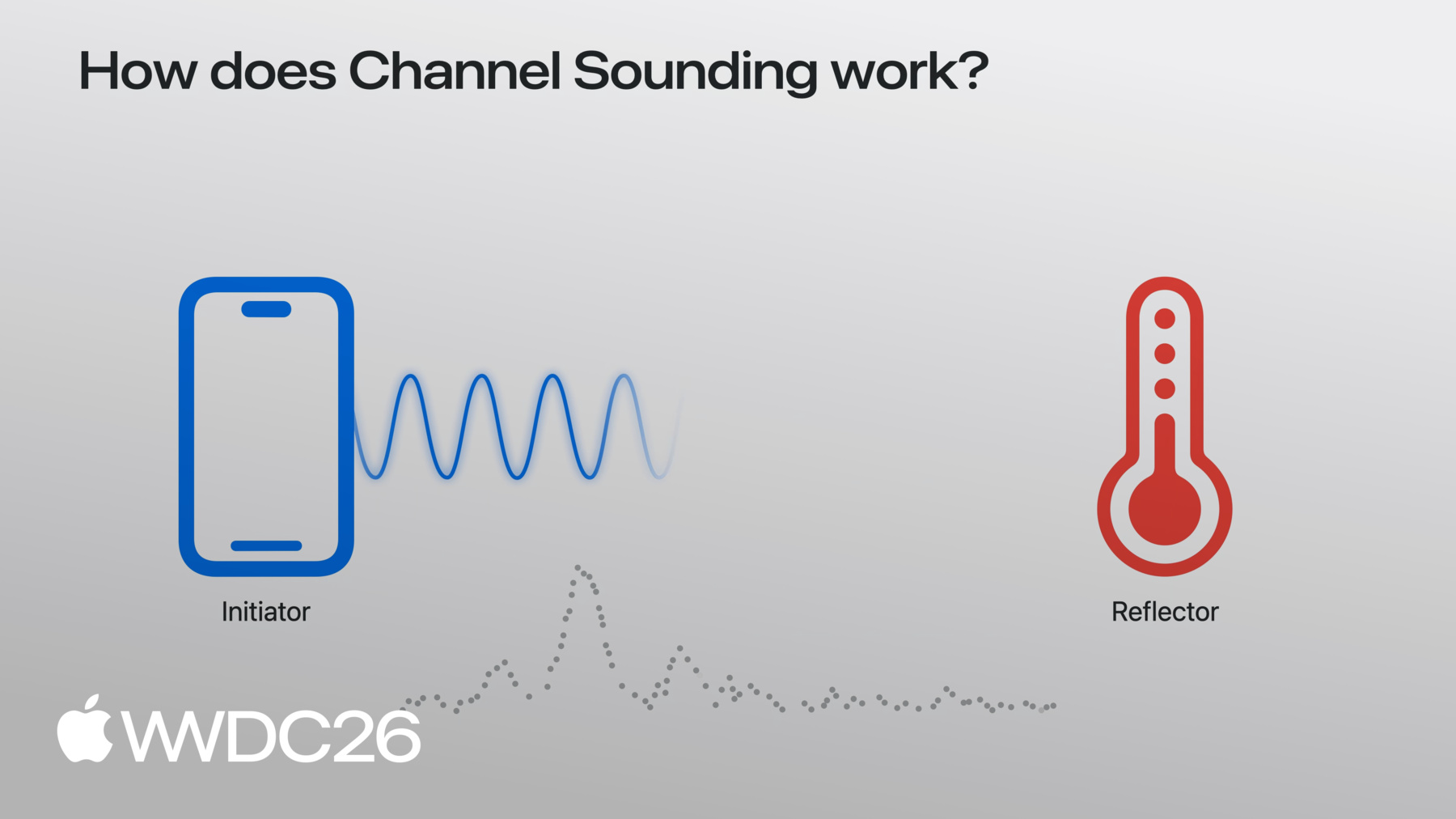
When I open the app, it says the probe is 8 meters to my right. That must be the smoker! With Channel Sounding, I won't mix up my temperature probes. I can measure distance to each one! There are a couple ways to measure distance and direction to third-party accessories on iOS. For the best accuracy, you can add an Ultra Wideband chipset to your accessory and use the Nearby Interaction framework in your app. For more information on this, watch the video "Explore Nearby Interaction with third-party accessories". But if your accessory only has a Bluetooth chipset, then Bluetooth Channel Sounding is your best option. You might have used RSSI in the past to estimate distance, but with Channel Sounding you can actually measure distance. We encourage you to try Channel Sounding, where your app could benefit from better accuracy. So, how exactly does Channel Sounding work? Let's say we have an iPhone that is paired and connected to a Bluetooth accessory. In this scenario, the iPhone is called an initiator and the accessory is called a reflector. The iPhone sends a signal, or tone, to the accessory, and the accessory reflects that tone back. The iPhone measures how the signal changes in transit, from one side, to the other, and back.
By repeating this process across the channels of the 2.4GHz band, the iPhone observes the rate of change in these reflected tones, from one channel to the next, and uses that to estimate the distance between the initiator and reflector. This process of measuring distance is called a procedure. So, how do you perform Channel Sounding in your app? If you just need distance, you can use Core Bluetooth. Before you begin, you'll want to ensure your accessory is paired and set up, using AccessorySetupKit, and connected through Core Bluetooth. You can refer to the documentation for more on how this is done. Now let's look at the code to measure distances. First, check that Channel Sounding is supported on the local iOS device, using CBCentralManager.supportsFeatures method.
Once you have a connected CBPeripheral, call startChannelSoundingSession on the CBPeripheral object.
iOS will repeatedly perform Channel Sounding procedures. When each procedure is completed, the delegate method peripheral didReceive results will be called with the measured distance in meters.
When you are ready to complete your Channel Sounding session, call cancelChannelSoundingSession.
When the session ends, the delegate method peripheral didCompleteChannelSoundingSession will be called.
Next, I'll tell you how to use Nearby Interaction to measure distance and direction. Again, ensure your accessory has been paired and set up through AccessorySetupKit, and connected via CoreBluetooth. Before creating a Channel Sounding session, check whether the local iOS device supports it, with the supportsBluetoothChannelSounding method.
Then create a configuration object, passing in the peripheral.identifier from CoreBluetooth as the bluetoothChannelSoundingIdentifier.
In order to get direction, CameraAssistance is required. Be sure to enable this if you need it.
Finally, create your NISession, set the delegate, and run it with the new accessory configuration you just created. If your app knows whether the accessory is moving or stationary, you can tell Nearby Interaction, and it will use that information to produce better direction estimates. Call updateMotionState on your session with your accessory object.discoveryToken.
For example, if your accessory is a mounted tag on a wall, pass .stationary. If it's attached to a moving object, pass .moving. The delegate callback is identical to what you'd get with UWB. You will receive NINearbyObjects updates with distance and direction.
Both the distance and the direction results benefit from the fusion of raw Bluetooth Channel Sounding measurements and camera inputs.
Remember that both, distance and direction, are optional. Distance may be nil, if the Channel Sounding measurement failed.
iOS automatically filters outliers and smooths your results for a better user experience. In iOS 27, use Channel Sounding when your app is in the foreground. When your app moves to the background, your Channel Sounding session will be paused.
Also be aware, that iOS may reduce the frequency of Channel Sounding measurements, if other Bluetooth or Wi-Fi activity increases. Channel Sounding is available on iPhones with the N1 chip.
Now I will explain how to make your accessories work well, with Channel Sounding on iOS.
Your accessory must support Bluetooth 6.3, and the inline PCT feature is required.
iOS uses phase based ranging, so your chipset must also support mode-0 and mode-2, as defined by the Bluetooth spec.
T_FCS is the interspace timing between tones. Make sure your accessory supports T_FCS of at least 100µs.
Alright, you've heard all about Channel Sounding, but what's next? Try out the APIs with a compatible accessory. Imagine how measuring distance would improve how people interact with your app. Ask your questions on the Developer Forums and send us feedback using Feedback Assistant. Thank you!
-
-
3:43 - Start a Core Bluetooth Channel Sounding session
import CoreBluetooth func isChannelSoundingSupported() -> BOOL { guard centralManager.state == .poweredOn else { return } if #available(iOS 27.0, *) { // Check current device supports Bluetooth Channel Sounding return CBCentralManager.supportsFeatures(.channelSounding) } } func startChannelSounding(_ peripheral: CBPeripheral) { guard peripheral.isConnected else { return } if #available(iOS 27.0, *) { // Step 1: Create a CBChannelSoundingSessionConfiguration let config = CBChannelSoundingSessionConfiguration(role: .initiator) // Step 2: Start the channel sounding session peripheral.startChannelSoundingSession(config) } } -
4:09 - Receive distance results and cancel a session
import CoreBluetooth // Receive distance results func peripheral(_ peripheral: CBPeripheral, didReceive results: CBChannelSoundingProcedureResults?, error: Error?) { guard let results = results else { return } let distance = results.distance // Do something with distance } // Cancel a Channel Sounding session func cancelChannelSounding(_ peripheral: CBPeripheral) { guard peripheral.isConnected else { return } if #available(iOS 27.0, *) { // Cancel the channel sounding session peripheral.cancelChannelSoundingSession(config) } } func peripheral(_ peripheral: CBPeripheral, didCompleteChannelSoundingSession error: Error?) { // Session is complete } -
4:41 - Start a Nearby Interaction Channel Sounding session
import CoreBluetooth import NearbyInteraction // Configure a Nearby Interaction Channel Sounding session func startChannelSoundingThroughNearbyInteraction(_ peripheral: CBPeripheral) { if #available(iOS 27.0, *) { // Step 1: Check current device supports Bluetooth Channel Sounding guard NISession.deviceCapabilities.supportsBluetoothChannelSounding else { return } // Step 2: Create an NINearbyAccessoryConfiguration let config = NINearbyAccessoryConfiguration( bluetoothChannelSoundingIdentifier: peripheral.identifier, previousChannelSoundingIdentifier: nil) // Step 3: Enable camera assistance for direction support if NISession.deviceCapabilities.supportsCameraAssistance { config.isCameraAssistanceEnabled = true } } } -
5:19 - Run a Nearby Interaction Channel Sounding session
import CoreBluetooth
import NearbyInteraction

// Run a Nearby Interaction Channel Sounding session
func runChannelSoundingThroughNearbyInteraction(_ config: NINearbyAccessoryConfiguration) {
    // Create an NISession
    let session = NISession()
    session.delegate = self
    // Run the NISession with the accessory configuration
    session.run(config)
}

// Improve Nearby Interaction direction outputs
func updateAccessoryMotionState(_ isMoving: Bool) {
    NIMotionActivityState motionState = isMoving ? .moving : .stationary

    // Tell NISession about.the accessory's motion state
    session.updateMotionState(motionState, forObjectWithToken: object.discoveryToken)
}

// Receive NISession updates
func session(_ session: NISession, didUpdate nearbyObjects: [NINearbyObjects]) {
    guard let object = nearbyObjects.first else { return }

    if let distance = object.distance {
        // Do something with distance
    }

    if let direction = object.horizontalAngle {
        // Do something with horizontal angle
    }
}
-
-
- 0:00 - Introduction
Discover the three aspects of Bluetooth Channel Sounding that will be discussed in this video.
- 0:50 - Overview
Find inspiration for using Bluetooth Channel Sounding.
- 3:17 - Core Bluetooth API
Learn how to get distance with the Core Bluetooth API.
- 4:34 - Nearby Interaction API
Get distance and direction with the Nearby Interaction API.
- 7:05 - Hardware tips
Understand the hardware requirements for Bluetooth Channel Sounding.